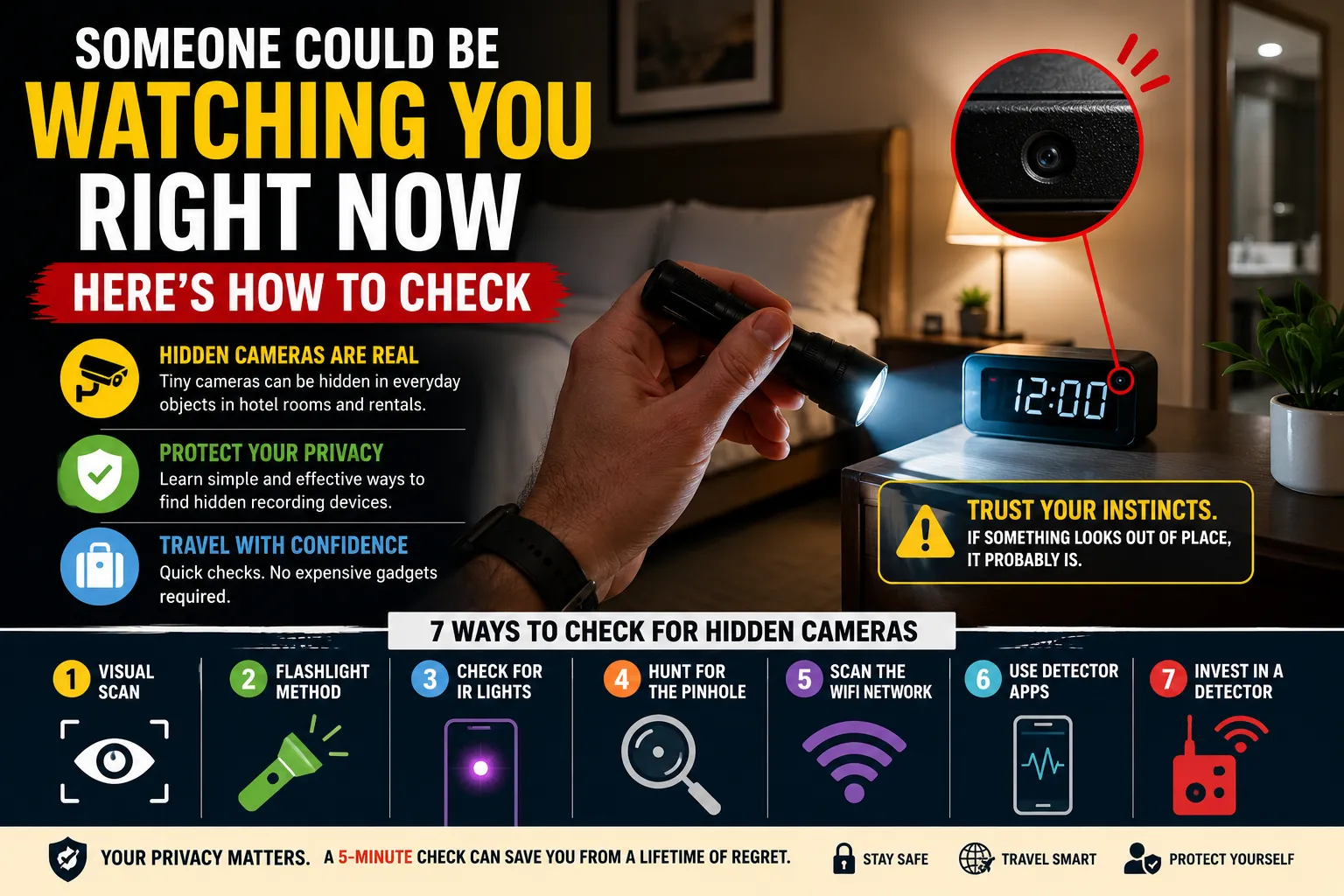
Someone Could Be Watching You Right Now — Here's How to Check
You've found the perfect place to stay. Great reviews, nice photos, fair price. You unlock the door, drop your bags, and finally exhale after hours of travel.
But what if the room isn't as private as it looks?
Hidden cameras in rental properties and hotel rooms are a real, documented problem — not just an urban myth or a paranoid traveler's nightmare. It doesn't happen everywhere or even often, but it happens enough that every traveler deserves to know how to protect themselves.
This guide gives you practical, actionable ways to sweep a room for hidden recording devices in under five minutes — no expensive gadgets required (though we'll cover those too).
Why This Is Worth Taking Seriously
The short-circuit camera market has exploded. Tiny, powerful lenses can now be embedded inside completely ordinary objects — things you'd never give a second glance in a hotel room or rental. Worse, these devices are inexpensive, widely available online, and increasingly hard to spot.
Short-term rental platforms have policies against undisclosed cameras, and many countries have laws making covert recording in private spaces illegal. But policies and laws only help after the fact. Your first and best line of defense is knowing what to look for the moment you walk in.
What Everyday Objects Can Hide a Camera
Before you know how to look, you need to know what you're looking for. Modern spy cameras are built to be completely inconspicuous. Common disguises include:
In the bedroom or living area:
- Alarm clocks (the clock face often hides the lens perfectly)
- Wall clocks and picture frames
- Smoke detectors and carbon monoxide alarms
- USB wall chargers and AC power adapters
- Bluetooth speakers
- TV remote controls
- Decorative houseplants
- Tissue boxes
In the bathroom (where the stakes are highest):
- Shampoo or body wash bottles
- Air freshener dispensers
- Toilet brush holders
- Vents or wall fixtures
The one thing all these devices have in common: somewhere on the object, there will always be a tiny hole — sometimes barely a millimeter wide — for the lens to see through. That pinhole is your biggest clue.
7 Ways to Check a Room for Hidden Cameras
1. Do a Visual Scan First
The moment you enter, spend two minutes simply looking around. You're not looking for anything sophisticated — you're looking for anything that feels off. Ask yourself:
- Is there an object here that doesn't belong? (A random charger near the bed when there's no outlet nearby. A smoke detector in a room that already has one.)
- Does anything have a tiny dark dot, hole, or glass-like surface on it?
- Are there cables running somewhere they shouldn't need to go?
- Are there items placed at angles that give a clear line of sight to the bed, couch, or bathroom door?
Trust your instincts. If something feels out of place, examine it more closely.
2. The Flashlight Method
This old-school trick is surprisingly effective. Turn off all the lights and close the curtains to make the room as dark as possible. Then, slowly sweep your phone's flashlight across every surface — walls, shelves, objects, vents.
Camera lenses are made of glass, and glass reflects light. Even a pinhole lens will produce a tiny but distinct glare when a light beam hits it at the right angle. This won't catch every camera, but it's one of the fastest and most reliable low-tech methods.
3. Check for Infrared Lights
Many cameras use infrared (IR) LEDs to record in low-light or dark conditions. Human eyes can't detect infrared light — but your smartphone camera can.
Turn off the room lights, open your phone's front camera (front cameras usually don't have IR filters), and slowly pan around the room. Any IR-emitting camera will appear as a purple or white glow on your screen, even in total darkness.
This is especially useful for spotting cameras positioned to record while you sleep.
4. Hunt for the Pinhole
If you're suspicious about a specific object, look for the pinhole up close. Hold it toward a light source and examine every surface carefully. The lens opening is often disguised as a screw head, a dot in a pattern, or simply a very small hole in the casing.
Once you find a pinhole, you've almost certainly found a camera.
5. Scan the WiFi Network
Download the free Fing app on your phone. When you connect to the property's WiFi, Fing will show you every device currently connected to the same network. While no one is going to label their hidden device "Bedroom Spy Cam," an unusual number of connected devices — especially ones with generic or unfamiliar names — can be a red flag worth investigating further.
This method won't detect cameras that record locally to a memory card without using WiFi, but it's a useful additional check.
6. Use a Hidden Camera Detector App
Apps like Hidden Camera Detector (available on Android) work by measuring electromagnetic field (EMF) emissions — the kind that active cameras and electronics give off. Point your phone around the room; the app beeps when it picks up a significant EMF reading.
A word of caution: these apps can throw false positives. Microwaves, TVs, and other plugged-in appliances also emit EMF. For more accurate results, unplug any devices you already know about and then scan. This way, only devices you haven't accounted for will trigger the alert.
7. Invest in a Dedicated RF/Lens Detector
If you travel frequently — especially for work — a handheld camera detector is worth the investment. Budget options on Amazon run around $25–$40 and can detect both RF (radio frequency) signals from wireless cameras and lens reflections from both wired and wireless devices. Higher-end models ($100–$300) offer professional-level sensitivity and are favoured by security experts and frequent business travellers.
What to Do If You Actually Find One
Stay calm, and do not touch or move the device. Here's what to do:
- Leave the immediate area — if it's in the bedroom, move to another room or step outside.
- Document it — photograph or video the device in place before anything is disturbed.
- Contact the platform — if you're in an Airbnb or other rental, report it to the company immediately via their app. Most platforms have emergency support lines and take these reports seriously.
- Call local police — covert recording in private spaces is illegal in most countries. File a report even if you're unsure you want to pursue charges, as it creates an official record.
- Find alternative accommodation — do not spend the night. Most platforms will assist with emergency rebooking.
A Quick 5-Minute Check-In Routine
Make this a habit every time you arrive somewhere new:
| Step | Action | Time |
|---|---|---|
| 1 | Visual scan of all surfaces and objects | 90 seconds |
| 2 | Flashlight sweep in the dark | 60 seconds |
| 3 | IR check with front camera | 60 seconds |
| 4 | Fing WiFi scan | 60 seconds |
| 5 | Close inspection of anything suspicious | As needed |
Five minutes. That's all it takes to dramatically reduce your risk.






Comments