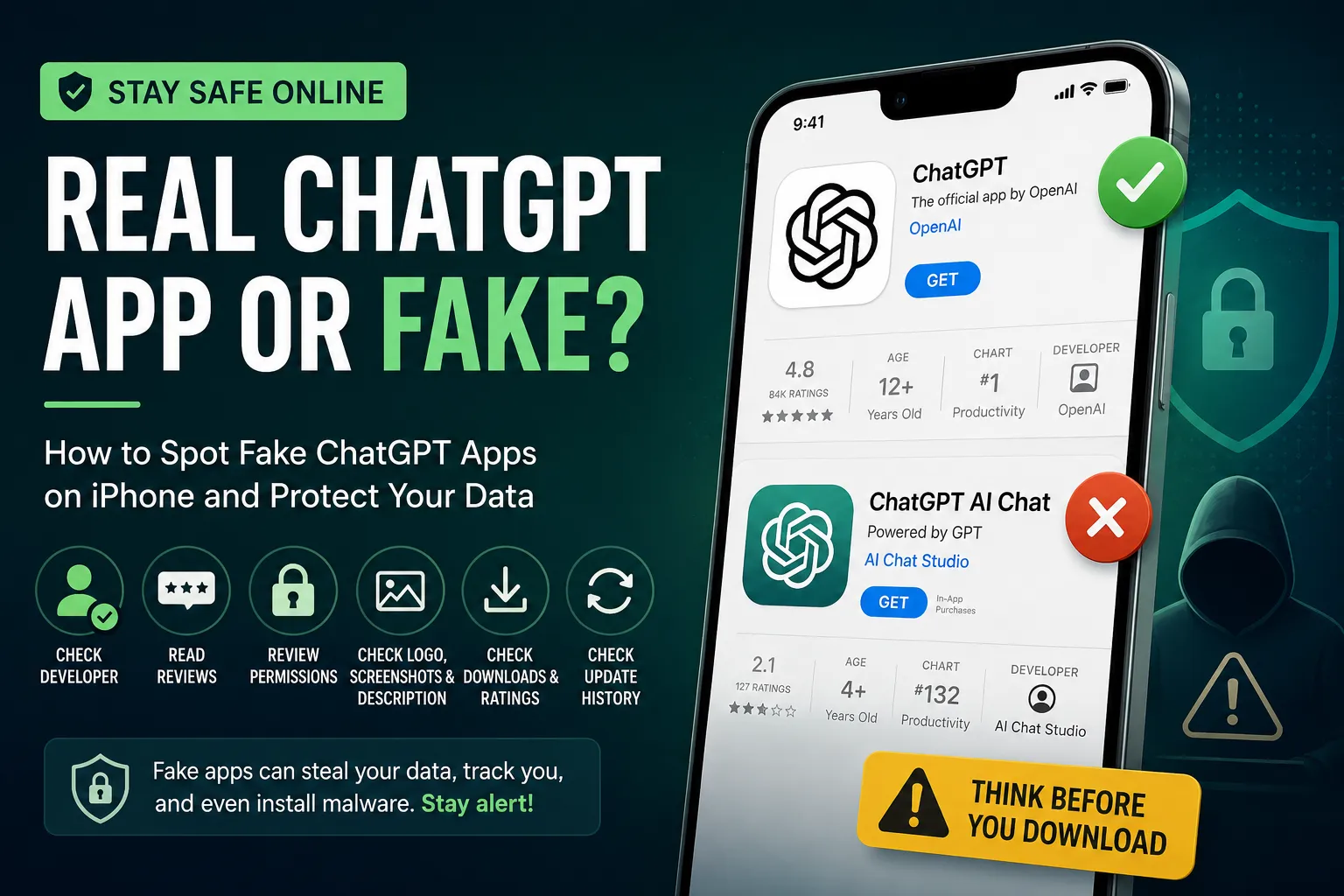
If you've searched for ChatGPT on the App Store, you've probably noticed something alarming: dozens of apps claiming to be the official ChatGPT. Most of them are fake — and some are outright dangerous. In this guide, you'll learn exactly how to identify the real ChatGPT app, avoid fake AI apps on iOS, and protect your iPhone from malware and data theft.
Does ChatGPT Have an Official App for iPhone?
Yes. OpenAI publishes an official ChatGPT app for iOS, available free on the Apple App Store. However, there is no official ChatGPT app on the Mac App Store — Mac users must download the desktop app directly from openai.com or use ChatGPT through a browser like Safari.
The golden rule: if the developer isn't OpenAI, the app isn't official.
Cybercriminals routinely exploit the popularity of trending tools like ChatGPT by publishing lookalike apps designed to steal your data, monitor your activity, or install malware on your device.
How to Identify a Fake ChatGPT App on the App Store: 6 Checks
1. Check the Developer Name (Most Important Step)
The fastest way to verify a ChatGPT app is to check the developer name on its App Store listing. The legitimate app will always show OpenAI as the developer — no exceptions.
If you see any other name in the "Developer" field, the app is not from OpenAI. You can also tap the developer's name to view their full App Store profile and see what other apps they've published. Fake developers rarely have a credible portfolio.
What to look for: Developer listed as "OpenAI" on the app page.
2. Read the User Reviews Carefully
Before downloading any app — especially one claiming to be an AI tool — scroll through the reviews section on the App Store. Genuine users leave detailed, specific feedback. Watch out for:
- A flood of vague five-star reviews posted on the same date (a tactic known as click farming)
- A high volume of negative reviews reporting suspicious behaviour
- Reviews that mention unexpected charges, data requests, or app crashes
- Don't rely on the star rating alone. Read the actual comments.
3. Scrutinise the App's Permission Requests
Before you download, check what permissions the app requests. A legitimate ChatGPT app needs very little access to function — primarily a network connection.
Be suspicious if an app asks for:
- Access to your contacts or address book
- Your precise location
- Access to your photos or camera
- Microphone access (unless explicitly offering voice features)
Any app requesting far more access than its purpose requires is a red flag. This is one of the most reliable ways to detect a fake AI app on iPhone.
4. Examine the Logo, Screenshots, and App Description
Counterfeit apps routinely cut corners on design. Before downloading, look closely at:
- The app icon — blurry, low-resolution, or off-brand logos are a giveaway
- Screenshots — poorly designed UI or stock imagery instead of real product screenshots
- The description — grammatical errors, awkward phrasing, or vague language about features
OpenAI's official app listing is professionally maintained. If anything looks sloppy or inconsistent with OpenAI's branding, trust your instincts and move on.
5. Check the Download Count and Ratings Volume
While not foolproof, an app's download count and total number of ratings provides useful context. The legitimate ChatGPT iOS app has millions of downloads and tens of thousands of reviews. Newly created fake apps typically show:
- Very low download numbers
- Fewer than a few hundred reviews
- A suspicious ratio of 5-star to 1-star ratings
Combined with other warning signs, a suspiciously low count is worth noting.
6. Check When the App Was Last Updated
Legitimate apps are updated regularly to fix bugs, patch security issues, and add features. If a ChatGPT app claims to be official but hasn't received an update in months — or worse, has never been updated — that strongly suggests it's abandoned or fraudulent.
Always check the "Version History" section on the App Store listing before downloading any app you're unsure about.
Why Fake ChatGPT Apps Are Dangerous
Fake AI apps aren't just useless — they pose serious security risks to your iPhone and your personal data. Malicious impostors may:
- Install spyware or malware on your device
- Track your browsing activity without your knowledge
- Harvest sensitive personal data including passwords and payment details
- Charge hidden subscription fees disguised as AI features
Apple's App Store review process reduces (but does not eliminate) the risk of fraudulent apps slipping through. User vigilance remains essential.
How to Download the Real ChatGPT App Safely
To guarantee you're downloading the legitimate app:
- Open the App Store on your iPhone
- Search for "ChatGPT"
- Look for the app developed by OpenAI
- Alternatively, visit openai.com and tap the App Store link directly from their website
Mac users: download the desktop app from OpenAI's official website only — it is not available on the Mac App Store.
Frequently Asked Questions
Is the ChatGPT app free on iPhone? Yes, the official ChatGPT app is free to download. A paid ChatGPT Plus subscription is optional and unlocks additional features.
Can fake apps steal my data on iPhone? Yes. Fake apps can request unnecessary permissions and use them to harvest personal data, monitor activity, or deliver malware.
How do I report a fake app on the App Store? Scroll to the bottom of the App Store listing and tap "Report a Problem" to flag suspicious apps to Apple.
Key Takeaways
Spotting a fake ChatGPT app comes down to a few simple checks: verify the developer is OpenAI, read genuine user reviews, review the permissions requested, and check the app's update history. When in doubt, download directly from OpenAI's website or navigate to the App Store listing through openai.com.
Staying alert takes just a few seconds — and it could save you from a serious security risk.






Comments